
-
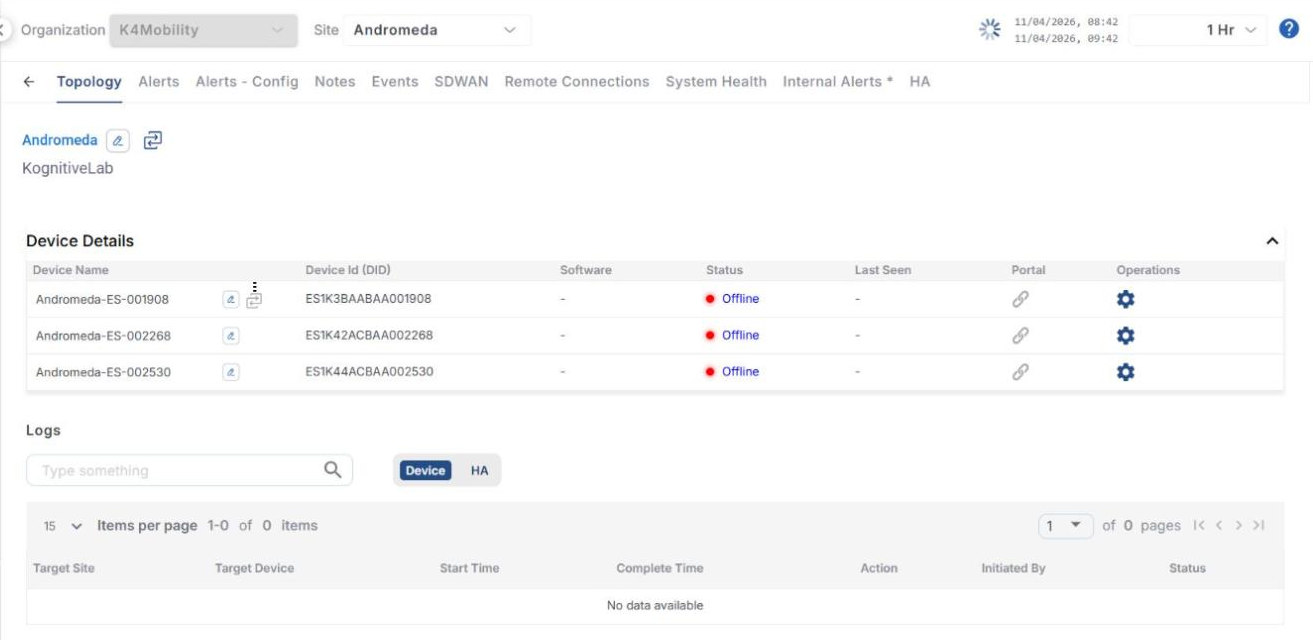
Once the user selects the required Site, the Topology screen opens. This screen lists all the devices deployed on the selected site under the Device Details section.
-
Click the Update Site Name

-
The screen shows information such as:
-
Device Name - Name of the device. Click the Update Device Name

-
Device Id (DID) - Identification Number of the Device
-
Software - Current software version of the Device
-
Status - Status of the Device (Online/Offline)
-
Last Seen - Date and time when the device was last online
-
Portal - Link to open the Edge Portal
-
-
The name of the Organization of the site is shown below the Site name.
-
Click the
-
The KonnectOS Configurations dialog box contains the following options in its left menu bar - Traffic Policy, Firewall, WAN Profile, Policy Route, Hub IP, Quota, System and Association. These options can be used to create, copy and modify various configurations for the selected device.
-
Refer the below page to perform the configurations.
Logs
-
The Logs section below the Device Details shows the log of the operations performed on the devices of the site, such as configurations applied from the Configurations dialog box.
-
Use the Device / HA toggle to view the device operation logs or the High Availability logs.
-
The table shows the Target Site, Target Device, Start Time, Complete Time, Action, Initiated By and Status of each operation.
-
Enter the required text in the Type something search field to search the logs.
-
Use the Items per page dropdown and the page navigation arrows to move between the pages.