
The Trends screen provides quick-look analytics organization-wide. Trends screen can be accessed by selecting the Trends option from the left menu bar of Kognitive Cloud. Use the filters at the top of the page to choose the Organization, Sites, WAN Sources, and Period of Time to display aggregate data and plots for the selection.
The Trends screen contains four tabs namely,
-
WAN (Usage)
-
Availability
-
Alerts
-
LAN
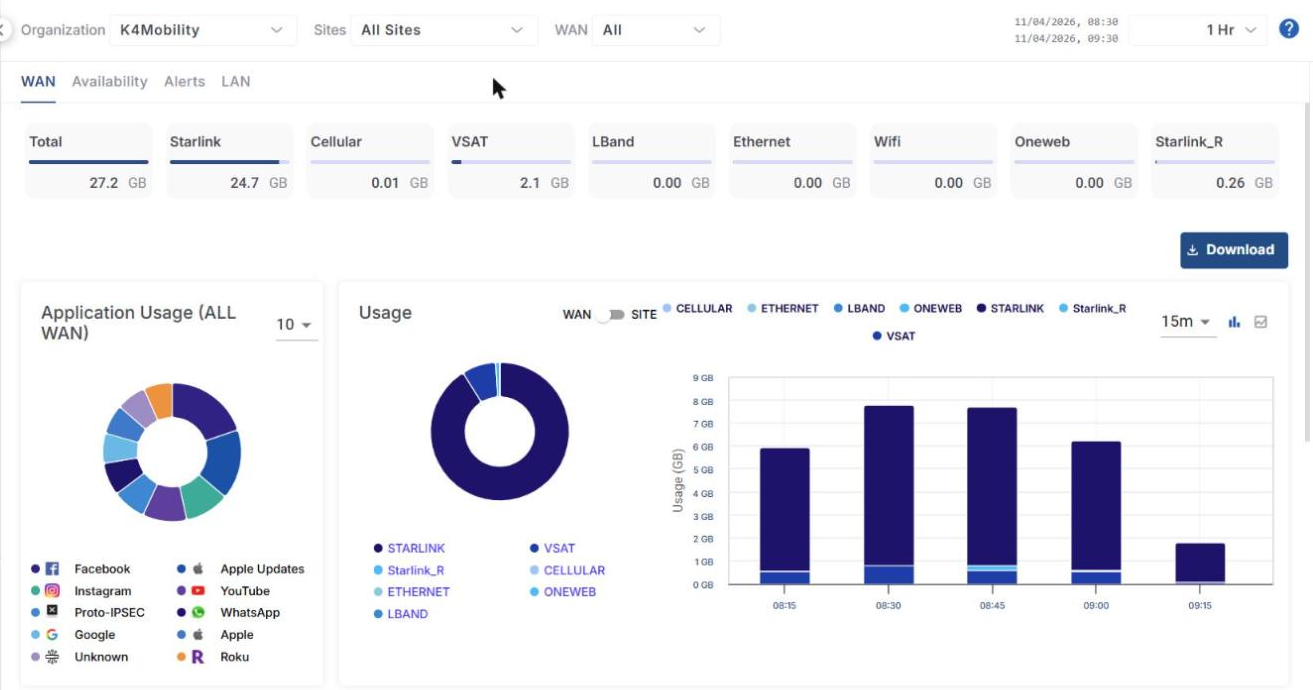
The filters are common for all the tabs. The WAN filter is not available in the LAN tab.
-
In the Organization field, select the Organization or sub-organization from the dropdown menu. The logged in admin Organization is populated by default here. This is the organization corresponding to the email ID used to login.
-
The dropdown list consists of all the sub-organizations under logged in admin organization.
-
In the Sites field, select the required sites from the dropdown menu. The dropdown menu consists of all the sites associated with the selected Organization and sub-organizations.
-
In the WAN field, Select the required WAN Sources.
-
Select the required Period from the time range dropdown at the top right corner of the screen.
Refer the below pages for detailed information about the WAN (Usage), Availability, Alerts and LAN tabs: