
Keywords: KonnectOS, GEO iDirect, VSAT Management
Configuring the GEO iDirect Interface (KonnectOS 8.x)
These steps set up the GEO iDirect interface so that its data is shown on the VSAT controller page.
-
Log in to the KonnectOS portal.
-
Select Interfaces > Physical Interfaces from the left menu. The page lists the interfaces on the KonnectOS device. By default only enabled interfaces are shown; tick All Interfaces to see all of them.
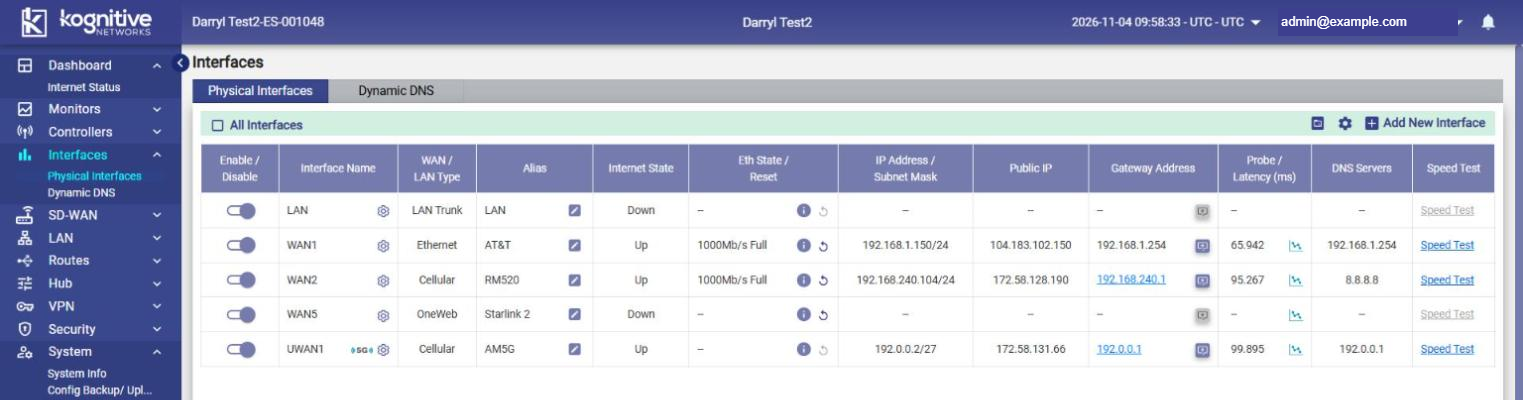
-
Remove the WAN interface to be updated from all WAN profiles.
-
Disable the interface with its Enable / Disable toggle. Settings cannot be edited while the interface is enabled.
-
Click the gear icon next to the interface. The Interface Settings dialog opens on the Type tab.
-
Check the Interface Name.
-
Set Interface Type to WAN.
-
Set WAN Type to VSAT.
-
Enter the Alias for the interface.
-
Click Save.
-
-
Click the icon in the Gateway Address column of the interface to open the VSAT Type settings.
-
Select Yes for Managed VSAT?.
-
In VSAT Type, select one of the options:
-
Global VSAT - non-Kognitive VSAT provider, single modem on VSAT1. The VSAT controller shows all available data. Beam switching is not supported with this option.
-
Kognitive Global VSAT - Modem1 (SES) on VSAT1.
-
Kognitive HTS VSAT - Modem1 (Hispasat) on VSAT1.
-
Kognitive HTS/Global VSAT - Modem1 (SES) and Modem2 (Hispasat) on VSAT1. SES and Hispasat run different iDirect platform firmware, so two modems are needed.
-
Kognitive Global VSAT - Multiple ISPs - Modem1 (SES/Intelsat) on VSAT1. The SES and Intelsat configurations are stored on the KonnectOS device and the right one is loaded on the modem.
-
Kognitive HTS/Global Coverage - Multiple ISPs - Modem1 (SES/Intelsat) and Modem2 (Hispasat) on VSAT1.
-
-
Click Save.
Configuring the VSAT Management Interface
-
Disable the VSAT management interface with its toggle.
-
Click the gear icon next to the interface. The Interface Settings dialog opens.
-
Check the Interface Name.
-
Set Interface Type to VSAT Mgmt.
-
Enter the Alias.
-
In VSAT WAN, select the VSAT interface that this interface manages.
-
Enter the Username and Password of the iDirect modem.
-
Click Save.
-
-
Enable the VSAT WAN interface again with its toggle.
-
Select Controllers from the left menu and open the VSAT tab. The modem data is fetched and shown there.