
Overview
Konnect OS provides a Quality of Service (QoS) mechanism that prioritizes IP traffic to ensure that critical or time-sensitive applications receive preferential forwarding over limited WAN bandwidth.
When multiple applications compete for WAN bandwidth, QoS ensures that higher priority traffic is transmitted first, maintaining service quality for business-critical applications.
Konnect OS supports four traffic priority levels:
|
Priority Level |
Description |
Typical Use |
|---|---|---|
|
Real-Time (RT) |
Highest priority traffic |
Voice, Video calls |
|
High (HI) |
Important business applications |
Operations systems |
|
Standard (ST) |
Normal traffic |
Web browsing |
|
Low (LO) |
Background or non-critical traffic |
Updates, crew internet |
The QoS scheduler processes packets in strict priority order:
Realtime → High → Standard → Low
Traffic in a higher priority queue is always processed before traffic in lower queues.
Prioritization becomes important only when WAN bandwidth is congested.
How It Works
Traffic prioritization is configured using three components:
|
Component |
Function |
|---|---|
|
Access Networks |
Assign default priority to devices or user groups |
|
Traffic Policies |
Identify applications and adjust their priority |
|
WAN Profiles |
Define WAN link priority and bandwidth limits |
Maximum Information Rate (MIR)
To ensure QoS operates correctly, each WAN priority level must have a Maximum Information Rate (MIR) configured.
The MIR defines the maximum bandwidth available for a WAN path.
This allows the QoS scheduler to properly manage bandwidth contention and enforce prioritization.
Example configuration:
|
WAN Priority |
WAN Link |
MIR (DL / UL) |
|---|---|---|
|
Priority 1 |
Ethernet |
300 / 100 Mbps |
|
Priority 2 |
Bonded Cellular |
100 / 20 Mbps |
|
Priority 3 |
VSAT |
10 / 2 Mbps |
The system will not transmit above the MIR defined for that WAN priority.
Example Use Case
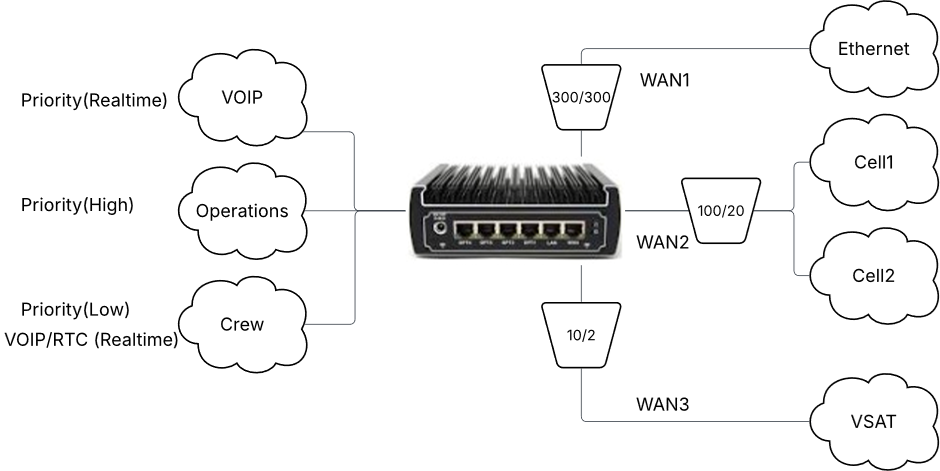
Prioritizing VOIP and Operations Traffic over Crew Access
Consider a network with three user groups:
|
Network |
Purpose |
|---|---|
|
VOIP |
Voice communications |
|
Operations |
Business applications |
|
Crew |
Crew internet access |
The goal is:
-
Ensure VOIP traffic receives the highest priority.
-
Allow Operations traffic to have higher priority than Crew traffic.
-
Prevent Operations traffic from consuming excessive bandwidth.
Step 1 — Configure the WAN Profile
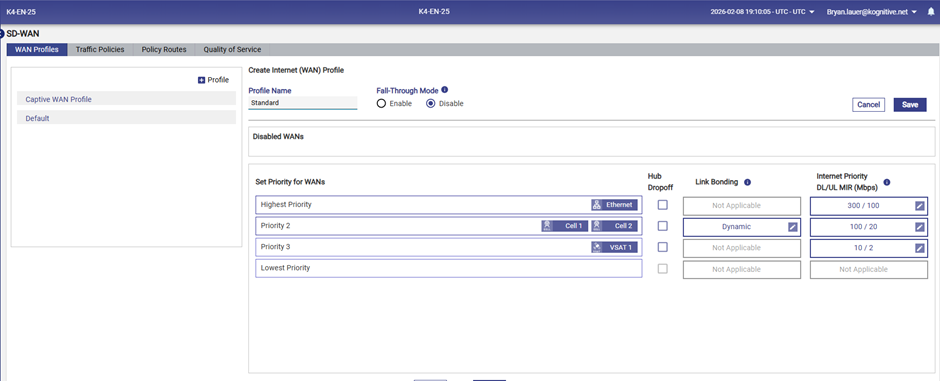
First configure the WAN profile that defines WAN link priority and MIR values.
Navigate to:
SD-WAN → WAN Profiles
Configure WAN priority order.
Example configuration:
|
Priority |
WAN Link |
|---|---|
|
Highest Priority |
Ethernet |
|
Priority 2 |
Bonded Cellular |
|
Priority 3 |
VSAT |
Set MIR values for each WAN link.
This allows QoS scheduling to operate correctly.
Step 2 — Configure Access Network Priority
Next, assign default priority to each access network.
Navigate to:
LAN → Access Networks
Set the Internet Priority for each network.
Example configuration:
|
Network |
Priority |
|---|---|
|
VOIP |
Realtime |
|
Operations |
High |
|
Crew |
Low |
This ensures that voice traffic receives the highest priority by default.

Step 3 — Prioritize VOIP Applications
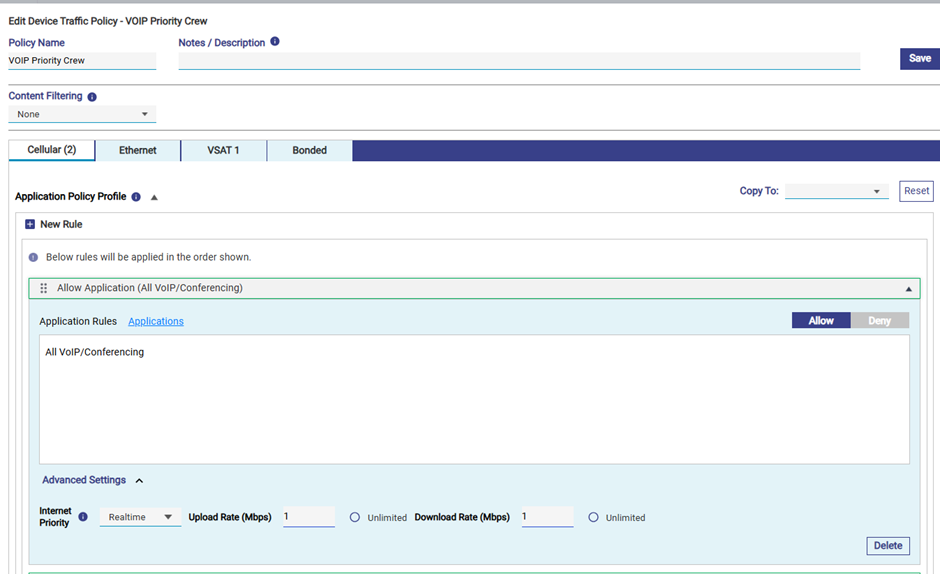
Crew network traffic is normally low priority, but voice or video calls from crew devices must still receive high priority.
To accomplish this, create a Device Traffic Policy.
Navigate to:
LAN → Device Traffic Policies
Create a rule:
|
Parameter |
Value |
|---|---|
|
Application |
All VOIP / Conferencing |
|
Internet Priority |
Realtime |
|
Upload Rate |
1 Mbps |
|
Download Rate |
1 Mbps |
This ensures voice calls receive the highest priority regardless of device or network.
Step 4 — Limit Operations Network Bandwidth
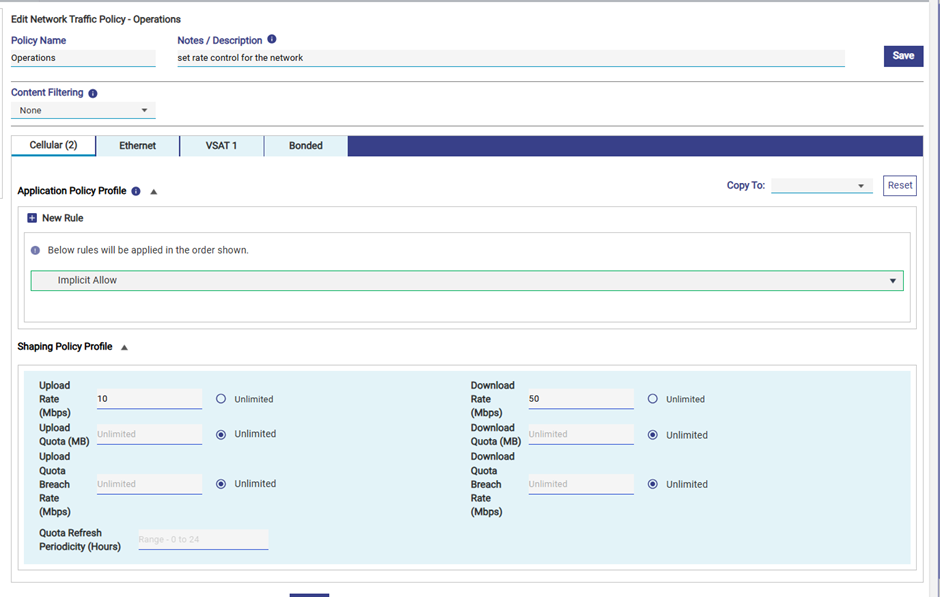
Operations traffic should have high priority, but must not consume all available bandwidth.
To prevent this, create a Network Traffic Policy.
Navigate to:
SD-WAN → Traffic Policies
Create a shaping policy:
|
Parameter |
Value |
|---|---|
|
Upload Rate |
10 Mbps |
|
Download Rate |
50 Mbps |
This ensures operations traffic cannot starve lower priority networks.
Resulting Traffic Behavior
With this configuration:
|
Network |
Default Priority |
Behavior |
|---|---|---|
|
VOIP |
Realtime |
Always prioritized |
|
Operations |
High |
Limited bandwidth usage |
|
Crew |
Low |
Lowest priority |
If WAN congestion occurs:
Realtime traffic transmitted first
↓
High priority traffic
↓
Standard traffic
↓
Low priority traffic
This guarantees that voice calls and operational applications remain responsive even during network congestion.
Best Practices
-
Always configure MIR values for WAN links.
-
Use Access Network priorities for user groups.
-
Use Traffic Policies to prioritize specific applications.
-
Apply rate limits to prevent lower priority networks from being starved.
-
Test prioritization behavior under load conditions.
Summary
Konnect OS QoS ensures efficient use of WAN bandwidth by prioritizing critical traffic.
The configuration involves three key elements:
Access Networks → Define default priority
Traffic Policies → Identify and prioritize applications
WAN Profiles → Define WAN paths and bandwidth limits
This architecture enables network administrators to maintain optimal performance for mission-critical services even when WAN bandwidth is limited.