
The CLI (KonnectOS Shell Interface) is a convenient way to run low-level commands for troubleshooting and diagnostics. To open it, select Tools/Diagnostics > CLI from the side menu bar. A shell session opens in the browser, see figure below.
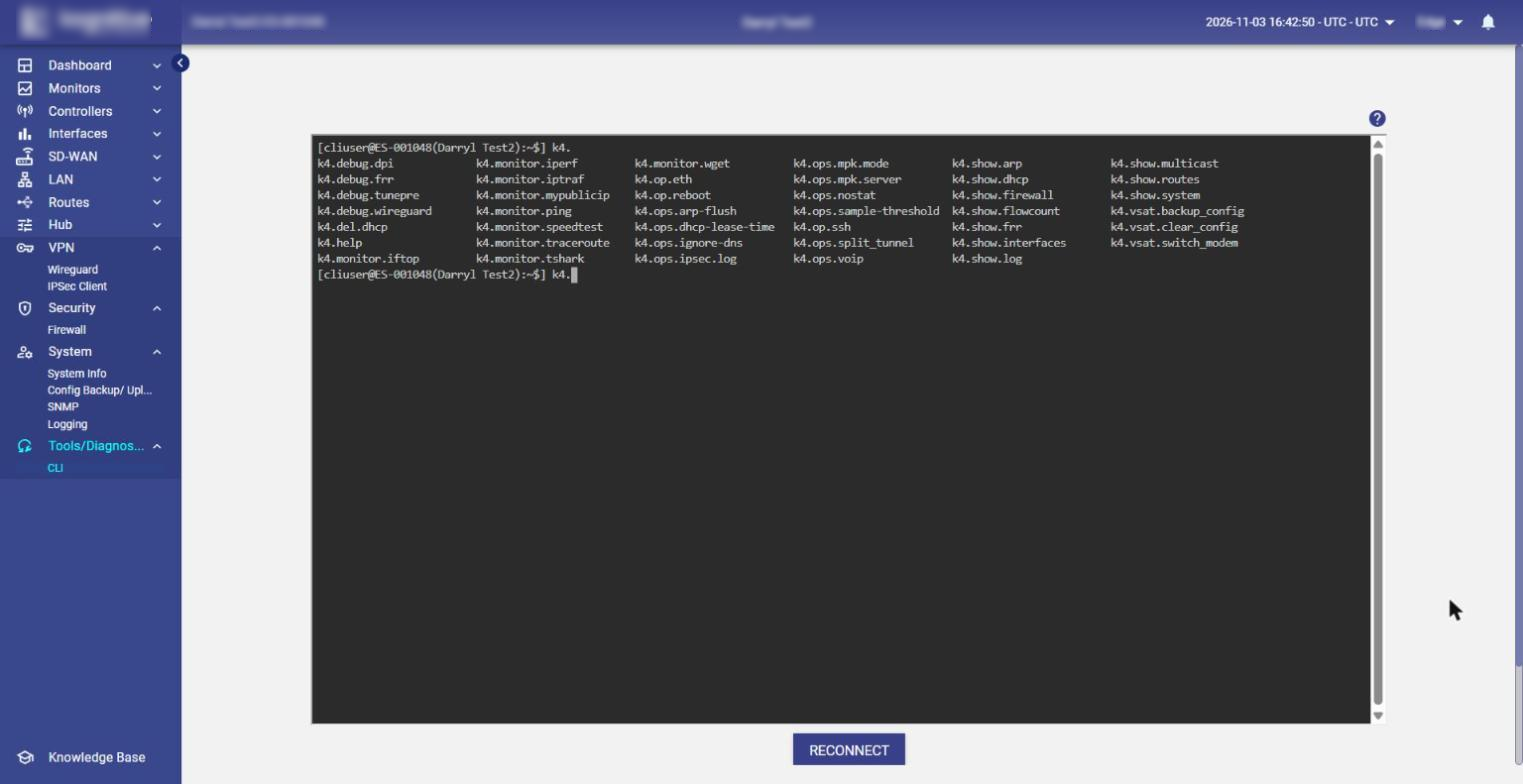
-
Type
k4.and press Tab twice to list all available commands (as shown in the figure). Tab completion also completes partially typed command names. -
Run
k4.helpto display the description and syntax of all commands. The output is shown in a pager: press Space to go to the next page and q to quit. -
Click the ? (Click here for Help) icon at the top right of the terminal to open the CLI help document. The full list of commands is also available here: https://cdn.k4mobility.com/cdn/edge/doc/k4help.pdf
-
If the session is disconnected, click RECONNECT below the terminal to open a new shell session.
Commands marked with ⚠ change the system state (for example, reboot the system, flush caches or change settings). Use them with care, preferably under guidance from Kognitive support.
Command List
The commands are grouped by prefix.
Help
|
Command |
Description |
|---|---|
|
|
Displays the description and syntax of all |
Debug (k4.debug.*)
|
Command |
Description |
|---|---|
|
|
Investigates the recent DPI hits (last 5 minutes). The output can be restricted to the local IP or subnet specified. |
|
|
Prints debug information about FRR (dynamic routing). |
|
|
Tunes the PRE parameters. ⚠ Changes the system state. |
|
|
Prints debug information about WireGuard: its running status and the WireGuard client logs. |
Monitor (k4.monitor.*)
Unless stated otherwise, -i interface uses the named native WAN interface, -v interface uses the VTP tunnel over the named WAN interface, and -l vlan runs the command as if the traffic came from the named VLAN. Options after -- are passed to the underlying Linux utility (run man <utility> for details).
|
Command |
Description |
|---|---|
|
|
Runs the Linux |
|
|
Runs |
|
|
Runs the Linux |
|
|
Shows the Internet-facing (public) IP for the WAN interface specified. With |
|
|
Pings a target IP or FQDN using ICMP ECHO_REQUEST. |
|
|
Runs a speed test using the Linux |
|
|
Runs the Linux |
|
|
Runs the Linux |
|
|
Runs the Linux |
Operations (k4.op.* and k4.ops.*)
|
Command |
Description |
|---|---|
|
|
Ethernet interface operation command. (No description is shown in ⚠ Changes the system state. |
|
|
Reboots the system, after asking for confirmation. ⚠ Changes the system state. |
|
|
Runs the Linux |
|
|
Flushes the ARP cache for the named interface. If an IP is specified, only that entry is deleted. ⚠ Changes the system state. |
|
|
Shows or sets the DHCP lease time. ⚠ Changes the system state. |
|
|
Turns the "Ignore DNS" mode on or off. When on, DPI ignores all DNS (udp/53) flows. Without a parameter, shows the current state. ⚠ Changes the system state. |
|
|
Turns IPSec logging on or off, or views the IPSec log. |
|
|
Shows or modifies the PEP (MultiPath Konnect) mode. ⚠ Changes the system state. |
|
|
Shows or modifies the MultiPath Konnect server. ⚠ Changes the system state. |
|
|
Turns the "No Stats" mode on or off. When on, WAN usage statistics are not collected. The system must be rebooted for a change to take effect. Without a parameter, shows the current state. ⚠ Changes the system state. |
|
|
Sets the DPI sample threshold. A reboot is required after a change. Without a parameter, shows the current state. ⚠ Changes the system state. |
|
|
Without an argument, lists the IP sets currently present for the Split Tunnel feature. With ⚠ Changes the system state. |
|
|
Configures VoIP, views CDR records and controls SIP logging. ⚠ Changes the system state. |
Show (k4.show.*)
|
Command |
Description |
|---|---|
|
|
Shows the ARP cache (runs the Linux |
|
|
Shows the current leases assigned by the Kea DHCP server. If an access VLAN or subnet is specified, only the leases pertaining to it are displayed. |
|
|
Lists the current firewall rules. |
|
|
Shows the current flow count for each local IP as tracked by DPI, sorted low-to-high. |
|
|
Passes the items to the |
|
|
Lists all non-virtual interfaces with their status, assigned addresses and TC configurations, and the speed and duplexity of Ethernet interfaces. |
|
|
Runs |
|
|
Shows the count of received multicast packets on the specified interface. If no interface is specified, shows the count for each VLAN interface. |
|
|
Shows the system routes. |
|
|
Prints a summary of the CPU, memory and disk status. |
Delete (k4.del.*)
|
Command |
Description |
|---|---|
|
|
Deletes the existing lease for the specified IP from the Kea DHCP server. ⚠ Changes the system state. |
VSAT (k4.vsat.*)
These commands are listed by Tab completion but have no description in k4.help. Use them only under guidance from Kognitive support.
|
Command |
Description |
|---|---|
|
|
Backs up the VSAT modem configuration. ⚠ Changes the system state. |
|
|
Clears the VSAT modem configuration. ⚠ Changes the system state. |
|
|
Switches the VSAT modem. ⚠ Changes the system state. |