
EF400
The EF400 is a rugged and flexible network appliance that is designed for use in many diverse applications. It can be mounted horizontally or vertically (wall-mount) and the orientation will not affect its function. For best performance, the EF400 should be mounted so that ambient or flowing air can pass across the heatsink fins. As there are no fans, the EF400 does not have an active cooling system and convection cooling is the primary means of removing heat from the device.
The EF400 is expandable in function through the use of USB dongles and adapters. Please consult the applicable Help Guides or contact Kognitive Networks for expansion options.
Detailed Port Descriptions
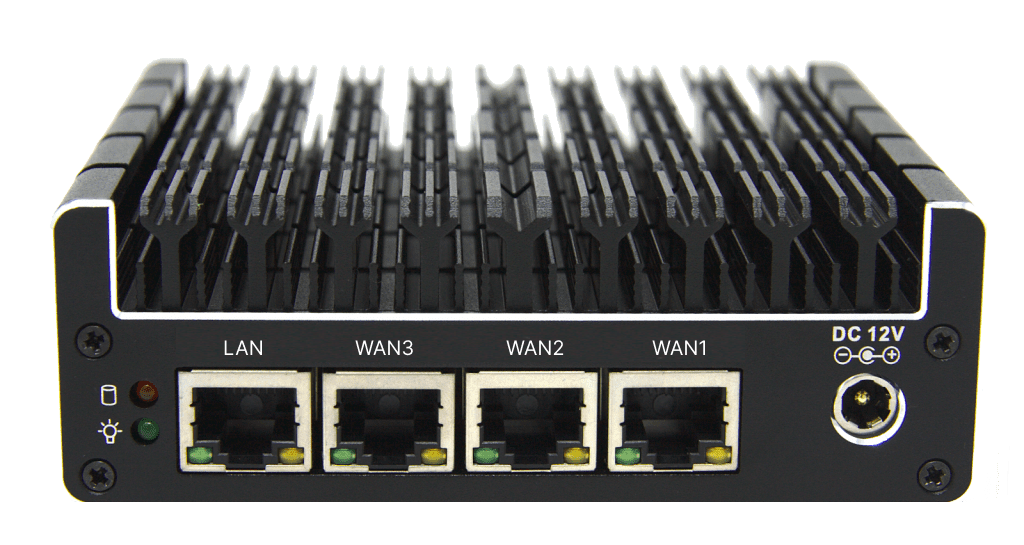
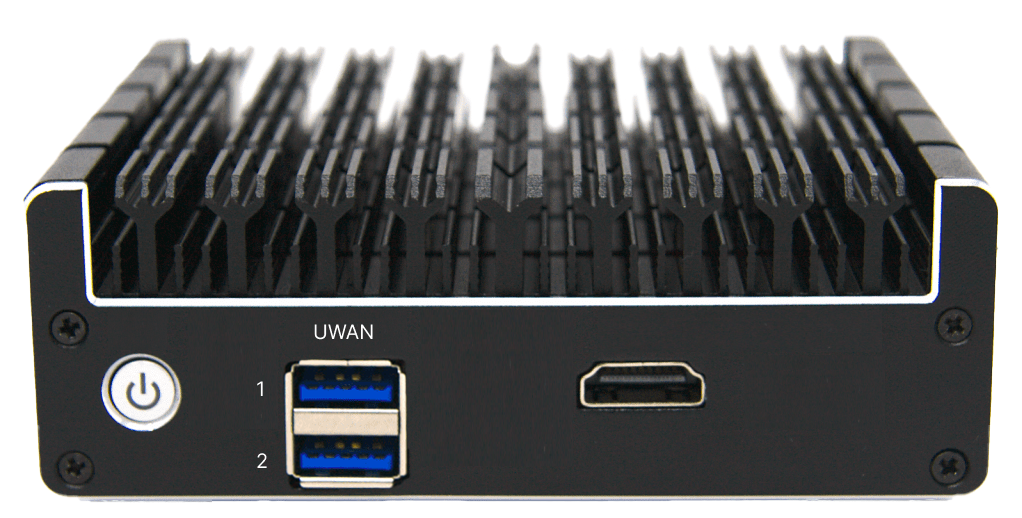
Port Specification
|
Port Label |
Specification |
Function |
|---|---|---|
|
LAN |
RJ45 : 1000/100/10 Mbps. |
DHCP (default) LAN, assignable to WAN input |
|
WAN 3 / 2 / 1 |
RJ45 : 1000/100/10 Mbps. |
WAN input, assignable to LAN |
|
DC 12V |
5.5 x 2.5mm : +12 VDC |
Power |
|
HDMI |
HDMI |
Terminal access / troubleshooting |
|
UWAN1 |
USB Type A : USB 3.0 |
User WAN port using cellular modem or USB to RJ45 ethernet adapter |
|
UWAN2 |
USB Type A : USB 3.0 |
User WAN port for USB to RJ45 ethernet adapter |
Power Specification
|
Power |
+12VDC (20W Max); 100-240 VAC, 50-60 Hz (AC/DC Power Supply Included) |
Power Button and Power States
The EF400 has 3 power states: On, Off and Sleep. The Sleep state is not widely used.
LED Indicators
The EF400 has 2 LEDs to indicate the power state and function of the device.
|
LED |
State |
Meaning |
|
Power LED |
Green |
Powered on |
|
Off |
Powered off |
|
|
HDD/SSD LED |
Red / illuminated |
Disk Usage |
|
Off |
Powered off |
Kognitive Networks recommends always using a dedicated Uninterruptable Power Supply (UPS) Battery Backup system for any EF400 installation that may see sudden, momentary power resets.
Mechanical
Mounting Features
Desktop, VESA Bracket, Optional 1RU Rack Mount
Weight
1.1 lbs, .50 Kg
Shipping Weight
2.8 lbs, 1.2 Kg
Environmental
Operating temperature range
-10°C to +50°C
Relative humidity
5% – 95% non-condensing
Device ID (DID) and Serial Number
Each device is assigned a unique Device ID (DID) and Serial Number. These identifiers are used for inventory management, registration, and customer support. The DID contains key hardware and manufacturing information, allowing customers and internal teams to identify the device model and configuration.
Device IDs are 17 characters long and follow the following format.
Example of an DID is - E41G5AABCDEAABBCC
Description
Type Code
The first two characters of the DID represent the Type Code, which identifies the product model. Type Code of the EF400 Model is E4.
Revision
Third character Revision is a single character that indicates the hardware revision of the device.
Manufacturer Code
Fourth character shows the Manufacturer Code. Refer the manufacturer codes below. In this example, G denotes the device was manufactured by GLiNet.
|
Manufacturer Code |
Manufactured By |
|
K |
K4 (Itasca) |
|
T |
Tecnova |
|
A |
Astronics |
|
G |
GLiNet |
Date
The next two characters denote the date - years from 2020 + month.
For example:
|
Code |
Year and Month Definition |
|
1A |
2021-10 |
|
1C |
2021-12 |
|
23 |
2022-03 |
|
2A |
2022-10 |
|
33 |
2023-03 |
Configuration
The next 5 characters denotes the configuration. These 5 characters are unique to each Model.
Serial Number
The last 6 characters are the serial number of the device.